Upgrade notes
- On installations with a lot of data, the upgrade may take several minutes longer than usual due to database migrations.
- This release contains breaking API changes. Review API changes below before upgrading integrations.
- Reporter now checks for updates at
securityreporter.com. Installations that restrict outbound traffic must allow this domain.
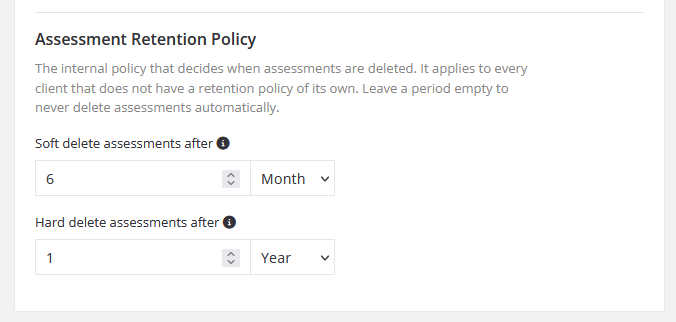
Assessment retention policy
You can now set how long Reporter keeps assessment data. Under Settings > General > Functionality > Assessment Retention Policy, choose when to remove sensitive data after completion (soft deletion) and when to remove the remaining record (hard deletion). Automatic deletion is off by default.
To use a different retention policy for a client, configure it on the client's edit page.
Reporter sends reminders before scheduled deletion. Review your settings carefully: existing assessments that are already past their new retention period can be deleted on the next nightly run without a reminder.
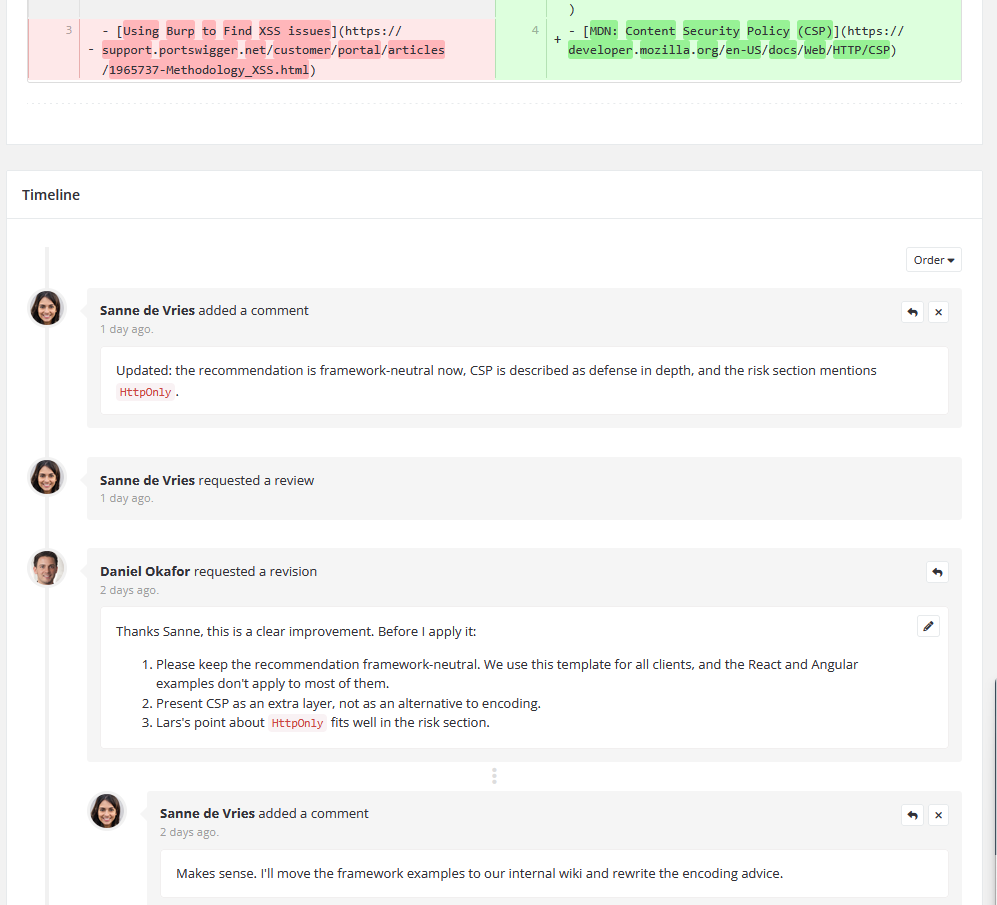
Finding template suggestions: review workflow
Researchers and template managers can now refine finding template suggestions together before they are applied. Each suggestion has its own page with a timeline for comments, and moves through a review: the author submits it, and a template manager either requests a revision or applies it. Researchers can now also view and edit suggestions made by others. Participants are notified of comments and review steps.
Existing suggestions are set to Under review on upgrade.
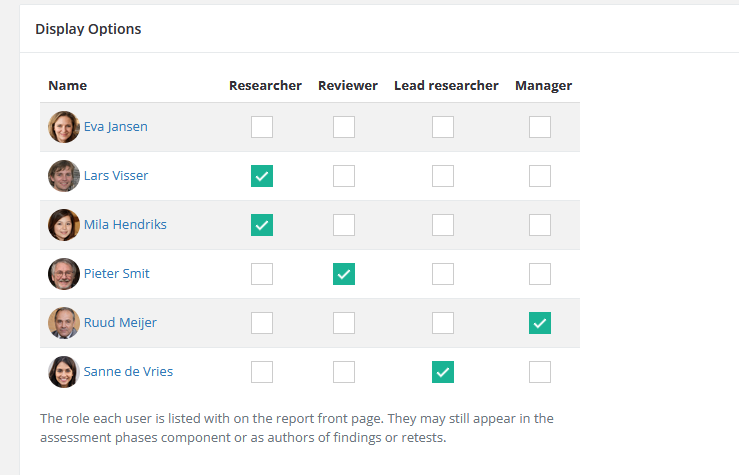
Researchers on report: roles
You can now credit a contributor as Lead researcher or Manager on the report front page, alongside the existing Researcher and Reviewer roles.
A single Researchers on report names placeholder replaces the three previous researcher placeholders, and can be filtered by role, for example to list only lead researchers. Theme text boxes and PDF metadata now use the same placeholders as the rest of the report. Existing content and themes are converted automatically.
Copy API tokens and review their scope
Use the new copy button in Settings > API Tokens to quickly create a token with an existing token's permissions and scope. Reporter copies the access you can grant and uses the default expiry.
The token form now shows which resources a client or assessment scope restricts and which remain shared, such as templates.
API changes
Updating existing integrations
API breaking changes
- Scoped tokens. Tokens with the Clients or Assessments scope now only return activities, tasks and notifications of their clients or assessments. For example, they no longer return login activities, template suggestion tasks or announcements. Webhooks created with these tokens are only sent for data of their clients or assessments.
- Tokens limited to assessments. Tokens with the Assessments scope can no longer create, edit or delete teams. They can no longer duplicate assessments. They can no longer change a client's client managers or account managers. To create a client user with such a token, use the new
POST /assessments/{assessment}/client-usersendpoint instead ofPOST /users. - Clients of users.
POST /usersandPATCH /users/{user}now reject clients for users without the client role. This applies to all tokens. To create a user with a token that has the Clients scope, sendrolesas["client"]. Also send clients with at least one client, and only clients of the token. - Users outside your clients and assessments. Some users are not assigned to any of your clients or assessments, for example the author of a comment who has since left the assessment. For these users, the API now only returns their ID, name, status, email and timestamps. The only include available for them is avatar. This applies to all tokens, except tokens of admins that are not limited to clients or assessments.
- API token includes. Replace
scopedClientswithclientsandscopedAssessmentswithassessments. - Activities about a client. Activities about a client no longer have
model_typeClientwith the client's ID inmodel_id. Use the newclient_idfield or theclientinclude instead. To list the activities of a client, usefilter[client_id]. - Researchers on the report. When updating an assessment, send
researchers_on_report.<id>.roleinstead ofresearchers_on_report.<id>.is_reviewer. Requests that still sendis_reviewerare rejected. TheresearchersOnReportinclude now returnsroleinstead ofis_reviewerin its pivot. The values of role are0(researcher),1(reviewer),2(lead researcher) and3(manager). - Finding assignee changes. On finding events and finding assignee events, replace the
addedUsersandremovedUsersincludes withusers. Readpivot.addedon each user to distinguish assignments from removals. - Date filters. The
filter[completed_at]filter on assessment phases and thefilter[last_used_at]filter on finding templates are removed. Use the_beforeor_aftervariant instead, for examplefilter[completed_at_after]. - Template suggestion tasks. The task types
13(Evaluate Suggested Changes to Finding Template) and14(Evaluate Newly Suggested Finding Template) are no longer used. Template suggestions now have the task types31(Complete Draft Finding Template Suggestion),32(Review Finding Template Suggestion) and33(Make Changes To Finding Template Suggestion After Review). Open tasks of type13or14become tasks of type32during the upgrade.
Find and assign assessment users
- New API routes let you find researchers and client users eligible for an assessment, or create a new client user and add them to the assessment in one step.
- Client leads can now use the API to add existing users from their own client to an assessment as client users, with the same permissions as in the portal.
Related data and API documentation
- Integrations can now read the resolution date per target on a finding and each contributor's role on a report.
- In the API documentation, each route's existing filters, sort fields, and includes are easier to read thanks to a new list layout.
Performance
Finding and section descriptions load faster when you revisit them. Reporter reuses unchanged Markdown while keeping mentions and assessment references up to date.
Assessment overviews load faster, as do API requests for large lists of records. Reporter makes fewer database round trips and reuses translations and permission checks.
Integrations that poll for changes to findings, finding events, or assessment sections also get faster results with filter[updated_at_after].
Other Improvements
- Replies to comments on findings, assessments, and sections now notify participants in Reporter, with immediate email notifications when enabled.
- When a report fails to generate, the assessment page now shows an alert and the user who started the generation is notified. Administrators can download the failure log from the alert.
- The researcher panel stays visible while it refreshes, with a small indicator instead of a loading spinner.
- Number placeholders, such as Finding count, can now write numbers out in words in the report language, optionally only up to a limit: for example, "five findings" but "25 findings".
- Code blocks support syntax highlighting for 32 more languages, including COBOL, Jinja, Mermaid, nginx, and Vue.
- The CWE classification list is updated to CWE 5.0, with 15 new weaknesses and updated names for existing ones.
- Changed behavior - With
SESSION_IP_TRUSTED_RANGESset, a session now continues when the user's IP address moves into any of the listed ranges, for example, when connecting to a company VPN after logging in from home. - Final reports and drafts with published content only now omit unpublished sections instead of showing a placeholder. Parent headings are kept for visible findings and subsections.
- ZIP exports now include only attachments from published report content that the user has permission to download.
- Team members' lead status on assessments now follows their role in the team. Changing that role automatically updates their lead status on the team's assessments. The Lead toggle under Client Access is therefore locked for team members. Existing assessments are updated automatically after the upgrade.
- Database backups now use a single transaction, so your team can keep working in Reporter and save changes throughout the backup.
- Overdue deadlines are highlighted in red for all researcher-side users, not only for users who can edit the assessment.
- Section references in Markdown link to the section page instead of its edit page.
- The Unresolved findings by severity chart on the Analytics page shows only vulnerability severities.
Bug Fixes
Reports
- PDF generation could fail when text followed a manual page break or an empty shortcode on the very next line. Those reports now render correctly.
- If an invalid image fails conversion, PDF generation now continues with an Invalid image placeholder in its place.
- Fixed a PDF generation error that could occur when a link crossed a page break and side-by-side code blocks appeared on the next page.
- Fixed an issue where code blocks could cause PDF generation to fail with a ‘needed too many passes’ error.
- Inline code now keeps its case in uppercase PDF and HTML headings. This also fixes a PDF generation error in affected headings. Finding references and to-do badges render correctly there.
- Results and checklist tables now render findings that lack a remediation status even when Show remediation status is set to Always.
- In PDF code blocks, highlights now align with the marked text even when the first line is indented or empty.
- The Finding count placeholder now uses the original severity when filtered by
original-severity. If a finding has no recorded original severity, it uses the current severity. - Turning off Include (academic) titles for researchers now also hides contributors' titles in the online report.
- An explicitly empty report component option such as
option=""is now treated as off. - Drafts that include unpublished content now count never-published vulnerabilities in the Findings by status and severity and Findings by remediation status and severity charts, using their current severity.
- Fixed an intermittent issue where opening a draft-report notification left the Download Report dialog loading when PDF passwords were enabled.
Assessments and client access
- Fixed an intermittent refresh issue in the researcher panel that could leave a published section marked as draft.
- After you delete an imported finding, the original assessment's researcher panel now clears the Moved label from the source finding.
- Client Access now verifies that each assigned team belongs to the assessment's client. Previously, members of an incorrectly linked team could gain access to that assessment.
- New teams granted access to all of a client's assessments now include those outside the creator's view. Reporter restores missing assignments for existing all-access teams on upgrade.
- Updating a team through the API now preserves its assignments when
assessmentsis omitted. If a team lost specific assignments in an earlier update, add those assessments again.
Integrations and other fixes
- Webhook event pages now open correctly for tool findings and link to the finding when the viewer has access.
- Deleting a checklist category could leave tasks for its test cases. Reporter now removes dependent data when a parent record is deleted and cleans up previously orphaned records on upgrade.
- Deleting a finding template now also clears tasks for suggested edits based on findings the template manager cannot see.
- IPv4-mapped IPv6 addresses now match IPv4 ranges in
SESSION_IP_TRUSTED_RANGES. - The n8n sort selector now lists valid fields individually. It could previously show a combination of fields as a single option.
- On forms with several dropdowns, each field now shows its own label for the empty option.
- Assessment and finding lists now use a stable order when sort values match. Tied items no longer repeat or disappear between pages.